Blender – Trim Mesh v1.1 Addon (Kushrio) Download
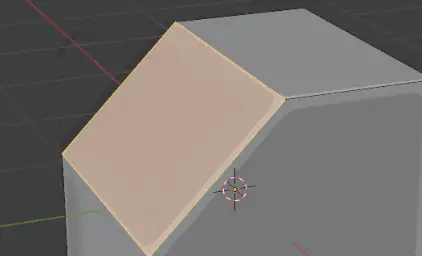
Trim Mesh is a small tool for trimming the mesh quickly.
You can select vertice / edge / face to trim it by its normal.
You can change the “Tilt Angle” to shift the cutting angle easily. Also you can change the Direction of the Tilt.
You can trim the convex part of the mesh easily without affecting other part.
Also Trim Mesh can slice the mesh without cutting out mesh. It becomes a very useful slicing tool.
Updates
Version 1.1.0:
Added the “Slice Only” option and Slice Count. Now you can use it as a loop-cut style slicing tool.
Usage
To use Trim Mesh, go to the Blender Edit mode.
Select any Vertice / Edge / Face.
Right Click in the 3D viewport, then select Trim Mesh at the bottom of the pop up Context Menu (blender’s menu).
Then you can change the tool setting at the left-bottom menu on the screen.
Downloads: show love to dev by purchasing if you can afford it
IF THE LINKS ARENT WORKING, THEN PLEASE ACT LIKE A GROWN UP AND MESSAGE ME/ COMMENT HERE OR ON DISCORD AND I WILL UPDATE THESE LINKS QUICKLY! MAKE SURE YOU DOWNLOADING PROPER FILE WITH PROPER EXTENSION LIKE .ZIP OR .RAR
Filename:Trim Mesh v1.1.0 vfxMed.zip
Official Discord : https://discord.gg/M2kqB4M9tG
USE IDM FOR FASTER DOWNLOAD.
https://send.now/n7wag1fox2f1 close Ads first then download
USE ANY FREE VPN IF U CANT DOWNLOAD THE FILE OR GET AN ERROR LIKE INTERNAL SERVER 500 ERROR!
ONLY USE BRAVE BROWSER TO DOWNLOAD WITHOUT ADS AND QUICKLY! GUYS MAKE SURE TO AVOID ADS!! DONT DOWNLOAD ADS, KEEP AN EYE ON SPAMMY WEBSITES THAT WILL OPEN WHEN YOU CLICK ON DOWNLOAD LINK!
MIRRORS:
for mega and g drive links – contact admin.







Post Comment