SwiftPie Menu v2.0.1 Blender Custom Menus and UI Panels Download
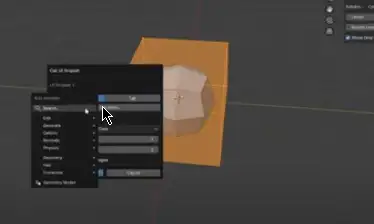
Swift Pie Menu 2.0 (Beta)
A Framework for Creating Custom Menus and UI Panels
Swift Pie Menu is not a pre-made set of tools, but a robust framework for building your own. The addon provides a comprehensive toolkit for constructing highly efficient, personalized menus and panels directly within Blender, minimizing reliance on default layouts and optimizing muscle memory for complex workflows.
The core philosophy is simple: reduce clicks, eliminate menu diving, and centralize access to any function, property, or custom script. This is achieved through a multi-layered system of customizable pie menus, popup UI panels, and traditional vertical menus, all managed from a single interface.
Key Features
1. Advanced Pie Menu Architecture
The foundation is a block-based grid system designed for maximum density and logical grouping of elements.
High-Density Layout
Configure up to 18 individual blocks (8 left, 8 right, top, bottom), each capable of holding 1 to 10 action buttons.
Granular Block Control
Each block is an independent module. Customize its visibility, number of buttons, label, icon, and color-coding for quick visual identification. An “Icons Only” mode is available for creating compact, minimalist layouts.
2. Action System: Unified Access to Blender’s Core
A button in Swift Pie Menu is a universal entry point. It can be assigned to execute a wide range of commands, going far beyond simple operators.
Operators
Execute any bpy.ops operator. The system intelligently captures operator properties from the UI context upon assignment, preserving tool settings (e.g., the segment count of a newly created sphere).
Properties
Directly control any animatable property via its data path. This allows for toggling boolean values (checkboxes), changing numerical parameters, and selecting items from enumerations (enums).
UI Panels
Display any standard Blender UI panel (e.g., the Modifiers or Constraints panel) in a separate popup window, providing focused access to complex property groups.
Pie Sub-Menu Chaining
Decompose complex workflows into logical hierarchies. An action button can call another, fully independent pie menu, which in turn can call the next.
Custom Regular Menus
For tasks not suited to a radial interface, a visual editor allows you to construct traditional vertical menus, including separators, labels, and nested sub-menus.
External Script Execution
Integrate custom automation by linking buttons to external .py files. This provides a direct pathway for technical directors and advanced users to run proprietary tools from a centralized UI.
etc
Downloads: show love to dev by purchasing if you can afford it
IF THE LINKS ARENT WORKING, THEN PLEASE ACT LIKE A GROWN UP AND MESSAGE ME/ COMMENT HERE OR ON DISCORD AND I WILL UPDATE THESE LINKS QUICKLY! MAKE SURE YOU DOWNLOADING PROPER FILE WITH PROPER EXTENSION LIKE .ZIP OR .RAR
Filename:Swift_Pie_Menu_v_2_0_1_Beta vfxMed.zip [193 KB]
Official Discord : https://discord.gg/M2kqB4M9tG
USE IDM FOR FASTER DOWNLOAD.
https://send.now/se1s29mmt8xa
USE ANY FREE VPN IF U CANT DOWNLOAD THE FILE OR GET AN ERROR LIKE INTERNAL SERVER 500 ERROR!
ONLY USE BRAVE BROWSER TO DOWNLOAD WITHOUT ADS AND QUICKLY! GUYS MAKE SURE TO AVOID ADS!! DONT DOWNLOAD ADS, KEEP AN EYE ON SPAMMY WEBSITES THAT WILL OPEN WHEN YOU CLICK ON DOWNLOAD LINK!
MIRRORS:
for mega and g drive links – contact admin.








Post Comment