MP Comp Blender Compositor Presets Free 2025 Download
Real-time VFX
By using Blenders real-time compositor, you can preview and playback the effects right in Blenders viewport!
So you can navigate and look around the scene, with the compositing set-up being applied in real-time!
Most of the effects only use a few milliseconds to render!
(Tested on a NVIDIA RTX 3060ti)
Adjust the look of your renders
MP_Comp has a lot of different tools to give you artist-friendly controls to develop your scene. The node-groups have been inspired by popular RAW and Photo editors, to provide a well-known and intuitive workflow.
Adjust the contrast, white balance, vibrance, color grading and add effects like tilt-shift, vignettes and more.
Emulate CRT, VHS and more!
With the complex filters of MP_Comp you get the most accurate VHS and NTSC filter for Blender on the market. The effects emulate modulation, tape damage, signal noise, color bleeding, chroma loss, luma smear and more.
There is also a CRT and TV effect to simulate scanlines, noise and back-panels!
Unleash your creativity and stylize your art!
Want to make your render look handpainted? Check!
Give it more of a Comic-like look? Check!
Just add some outlines to highlight the shapes? Check!
On top of making your scenes look painted, you also get tools that help you with compositing your assets like drop-shadows, and also effects to refresh the way you think of your scene, like modulation and edge-detection.
You don’t have to start from scratch! Generate your assets right in the compositor!
There are a lot of different generative, procedural effects you can choose from.
Create backgrounds, add venetian blinds or scanlines, generate lens overlays or add a lens flare to your scene.
By the way, the lens-flare is pretty advanced, with features like exposure falloff based on the distance to the centre, high amount of customizations, procedural overlays that become visible when the lens flare hits them and much more!
The definition of FX
With the Distort effects of MP_Comp, you gain access to the ability of making really flashy edits, with glitch effects, RGB-slide (inspired by VideoCopilots Twitch effect), RGB-split and vortex-effects! Great for doing music videos, AMVs, edits and transitions!
If you’re not into that kind of stuff, there are also a lot of effects which you can use in both subtle and exaggerated ways. Like camera shake (inspired by S_Shake), turbulent displacement, wave displacement and twirl!
Not limited to only 3D and CGI!
Of course you can also use Blenders Compositor and MP_Comp without being interested in creating 3D-Graphics. You can also use videos, images and image-sequences as inputs for the compositor and use the effects on them!
You can also get the best of both worlds by combining and composing 3D and 2D elements!
It’s also quite intuitive to use the 3D-viewport to create 2.5D scenes or to just sticking to basic 2D entirely. This is actually a great way to create motion-graphics and by using MP_Comp the capabilities of what you can achieve within Blender get scaled!
Blenders Compositor is just limited by not having a lot of options to cache your results.
Luckily, there is an add-on for that, which let’s you create a disk cache of your compositing set-up, which you can then playback in real-time in Blender!
Blender Disk cache add-on: https://github.com/cgvirus/Blender-Compositor-Disc-Cache-Realtime-Preview-Addon
Will the Compositing be baked into the render?
Since the 3D-rendering part of the pipeline takes a lot longer than the compositing, you usually don’t want to re-render it.
But let’s say, you review your final result and decide to retouch the compositing. It would be unnecessary to also re-render the 3D-viewport for this.
There are several way to avoid this, by seperating the composited result from the raw render:
Use Blenders “File Output”-node in the Compositor and connect it to the “Render Layers”-node. This way, you will export both the composited result and the raw render into the specified directories.
Export your render as a multi-layer OpenEXR file(s). This way, the raw and the composited render pass will be on their owen seperate layer.
Disable the compositing node-tree when rendering the 3D-scene. Then import the raw render as an image (sequence) into the compositor and use it as an input instead.
The third option is recommend, because it is fairly easy to do, doesn’t limit you in your choice of file formats and enables you to benefit from better performance of real-time compositing, since Blender will just have to load a file instead of re-rendering the viewport.
Quickly apply one of the color-presets!
There are several pre-defined color-corrections you can use to get an idea of what your render can look like.
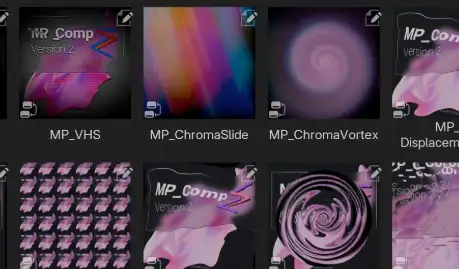
You can always add the nodes by using “Shift+A”, but for this process it is recommend to use the Asset-browser, since all the effects and color-corrections have preview-thumbnails. So, you don’t have to solely rely on trial and error adding the different nodes.
Made with UX in mind
While designing the effects, I constantly considered how to keep them intuitive and easy-to-use. But how does this affect you?
You can expect:
Well seperated input-values into multiple panels
Input-values being mapped and capped to the ranges they work best in
Good default settings, which prefer less ressource-heavy values to prevent performance spikes
Nodes being sorted into different categories and color-coded accordingly
Thumbnail-previews of the effects in the asset-browser
Nodes having a lot of description and tool-tips to better understand the inputs
Downloads: show love to dev by purchasing if you can afford it
IF THE LINKS ARENT WORKING, THEN PLEASE ACT LIKE A GROWN UP AND MESSAGE ME/ COMMENT HERE OR ON DISCORD AND I WILL UPDATE THESE LINKS QUICKLY! MAKE SURE YOU DOWNLOADING PROPER FILE WITH PROPER EXTENSION LIKE .ZIP OR .RAR
Filename:MP_Comp v2.0.2.zip
Official Discord : https://discord.gg/M2kqB4M9tG
USE IDM FOR FASTER DOWNLOAD.
https://send.now/3vm1vsz37mwy close Ads first then download
USE ANY FREE VPN IF U CANT DOWNLOAD THE FILE OR GET AN ERROR LIKE INTERNAL SERVER 500 ERROR!
ONLY USE BRAVE BROWSER TO DOWNLOAD WITHOUT ADS AND QUICKLY! GUYS MAKE SURE TO AVOID ADS!! DONT DOWNLOAD ADS, KEEP AN EYE ON SPAMMY WEBSITES THAT WILL OPEN WHEN YOU CLICK ON DOWNLOAD LINK!
MIRRORS:
for mega and g drive links – contact admin.





Post Comment