Artstation – Plasticity for AAA Game Assets Free 2026 Download
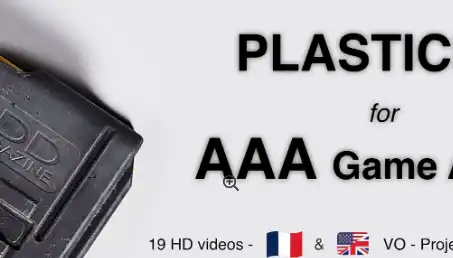
Whether you want to learn Plasticity or create AAA game art, this tutorial is for you. We’ll cover the entire process by creating a Daniel Defense Magazine, from the Plasticity/CAD stage to the final textured asset. A basic understanding of 3D modeling and baking workflows is recommended.
Chapters:
0-Introduction to Plasticity and Blender:
In this chapter, I will show you all the basics of plasticity, showcasing the shortcodes, tools, and tips you’ll need to follow this course.
For Blender, I will mainly cover all the addons I’m using during this course, how and why I’m using them, and some tips.
1-Plasticity:
This chapter is where we will create the base model of the magazine in plasticity. I will share my expertise about CAD for games, how I’m working, what you should avoid and why, etc.
2-Export:
When the CAD model is done, it’s time for exporting! I will cover how to export the CAD into OBJ models, with two models, one for the low poly and another one that we will use for the high poly. I’m showing how to export from Plasticity and Moi3D.
3-Lowpoly:
In this chapter, we will import the OBJ model we exported from Plasticity in Blender, and we will optimize it to get a AAA low poly / game ready model.
4-UVS and Baking:
It’s UVs time! We will explore how to unwrap the model, optimize the islands, understand texel density, and how to get good packing.
5-Highpoly:
Here, we will create the high poly by using a voxel remesh workflow, directly in Blender or Zbrush using the high OBJ export we did previously.
6-Baking:
In this chapter, we will cover all the baking part of the workflow, using Marmoset Toolbag. I will explain how to bake correctly, how to fix some bake issues, and share some tips with you.
7-Texturing:
It’s time to give life to our magazine! We will look into how to get our project ready in Substance Painter. I’ll walk you through the process of texturing the magazine from scratch, helping you to better understand how to interpret references and create realistic, AAA-quality textures.
Requirements:
Plasticity (Trial, Indie or Studio license)
Moi3D trial //Optional
Blender (or any other DCC like 3DS Max, Maya, Modo, etc…)
Zbrush //Optional
Marmoset Toolbag
Adobe Substance Painter (version 10 or later if you want to open the source file)
Note:
Videos contain both audio languages (ENG & FR). Audio should be in English by default, but if it’s not, check the audio track.
In Substance Painter, I’m using grunges from greyscalegorilla.com and DGruwier Surface Imperfections – Volume 1 pack, these grunges won’t be included because it’s paid content.
Release Notes
– licence fix
Downloads: show love to dev by purchasing if you can afford it
IF THE LINKS ARENT WORKING, THEN PLEASE ACT LIKE A GROWN UP AND MESSAGE ME/ COMMENT HERE OR ON DISCORD AND I WILL UPDATE THESE LINKS QUICKLY! MAKE SURE YOU DOWNLOADING PROPER FILE WITH PROPER EXTENSION LIKE .ZIP OR .RAR
Filename:Plasticity For AAA Games.zip.001 and more below
Official Discord : https://discord.gg/M2kqB4M9tG
USE IDM FOR FASTER DOWNLOAD.
https://send.now/eeamgtb5mloa
https://send.now/zjlaul2sr7fx
https://send.now/93hybuxskgl9
https://send.now/q3edfkwlr7zv
https://send.now/jd15vvmivd40
https://send.now/ylisderodjpt
https://send.now/v5wi3o1non3z
https://send.now/jnh9id11n3aq
https://send.now/8dmsqrd24orm
MUST DOWNLOAD ALL PARTS INTO SAME FOLDER THEN EXTRACT 001 FILE USING 7ZIP ONLY DONT RENAME ANYTHING!
USE ANY FREE VPN IF U CANT DOWNLOAD THE FILE OR GET AN ERROR LIKE INTERNAL SERVER 500 ERROR!
ONLY USE BRAVE BROWSER TO DOWNLOAD WITHOUT ADS AND QUICKLY! GUYS MAKE SURE TO AVOID ADS!! DONT DOWNLOAD ADS, KEEP AN EYE ON SPAMMY WEBSITES THAT WILL OPEN WHEN YOU CLICK ON DOWNLOAD LINK!
MIRRORS:
for mega and g drive links – contact admin.
Post Comment